Choosing Which Notifications You Get
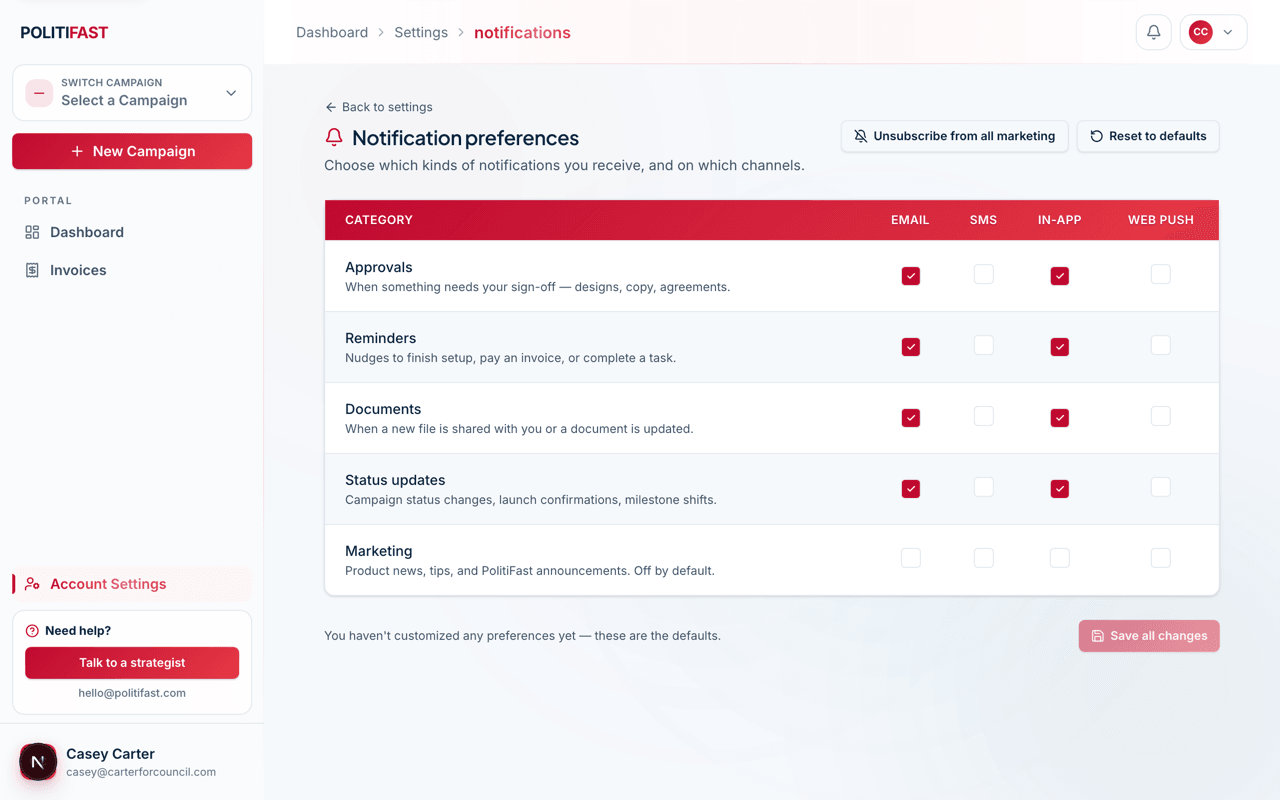
The notification preferences grid — categories, channels, and the one-click marketing unsubscribe.
Last updated 10/16/26
PolitiFast always emails you about money and your account: invoices, invoice reminders, payment receipts, failed payments and refunds, plus sign-in, password, two-factor and invitation emails. Once we've prepared an order and emailed it to you to sign and pay — or you've signed one and the deposit is still due — you'll also get a few reminders about it, two days apart. Every other email — design approvals, status updates, reminders about setup you started yourself, and the rest — is off until you turn it on, from Settings → Notifications.
Always on
Billing and Account & security sit at the top of the grid marked Always on. You can't turn those off — they're how you receive your invoices, deposit and sign-and-pay reminders, and keep access to your account. An email someone on our team sends you directly (a reminder, a design proof, word that your site is live), and any request your work is waiting on (like content or design details we need from you), also always reaches you. PolitiFast newsletters and announcements reach your account only if you turn on Marketing.
How the grid works
Preferences are a grid: notification categories down one side, delivery channels across the top. Below the always-on rows, toggle any combination.
The categories:
- Approvals — something is waiting on your sign-off (designs, creatives).
- Reminders — nudges about setup you started yourself and other pending items. (Reminders about an order we prepared and emailed you to sign and pay, or a deposit you owe, are billing email and always come.)
- Documents — agreements and files that involve you.
- Status — progress updates on your sends, orders, and projects.
- Marketing — product news and offers from PolitiFast.
The channels: email, text, in-app, and web push.
On a campaign team
Emails about a campaign's designs, orders and progress follow everyone's own settings: the owner gets each category they've turned on, and so does any teammate — admin, editor or viewer — who turns it on here for themselves, each in their own email. Teammates only get emails their role covers — viewers, for example, don't get design emails or ad designs to approve. Your settings apply to every campaign you're on.
Emails our team sends directly, and requests your work is waiting on, always reach the person they're addressed to (usually the owner). A teammate gets their own copy when they've turned on the matching category:
- Approvals — a design proof, or a draft of your site, is ready for your review.
- Reminders — something we need from you: design details, your site content, domain, email-marketing or donation setup, changes to your texting registration, or a nudge to finish setting up a service.
- Status — your site is live.
These copies also follow roles: they go to teammates who can do the work, so viewers get the site-live email but not the approvals or reminders above.
Invoices and receipts go only to the campaign's billing contact.
The one-click marketing opt-out
An Unsubscribe from all marketing button turns off every marketing notification across every channel at once, without touching your operational notices.
Our recommendation
Turn on approvals and reminders by email — they're how you learn work is blocked on you, and an unnoticed approval is the most common reason a project slips. Status updates are taste; marketing is entirely up to you.
Saving your changes
Flip any boxes you like, then click Save all changes. Reset to defaults turns every email back off (billing and account emails keep coming).
Missing an email you expected?
If an approval notice never arrived, check your preferences first. For a missing invoice or receipt, email us — we'll trace where it went.