Ordering Work from Your Portal
The Order Work button is the front door for new requests — what you can order directly, what gets quoted, and what happens after you submit.
Last updated 08/05/26
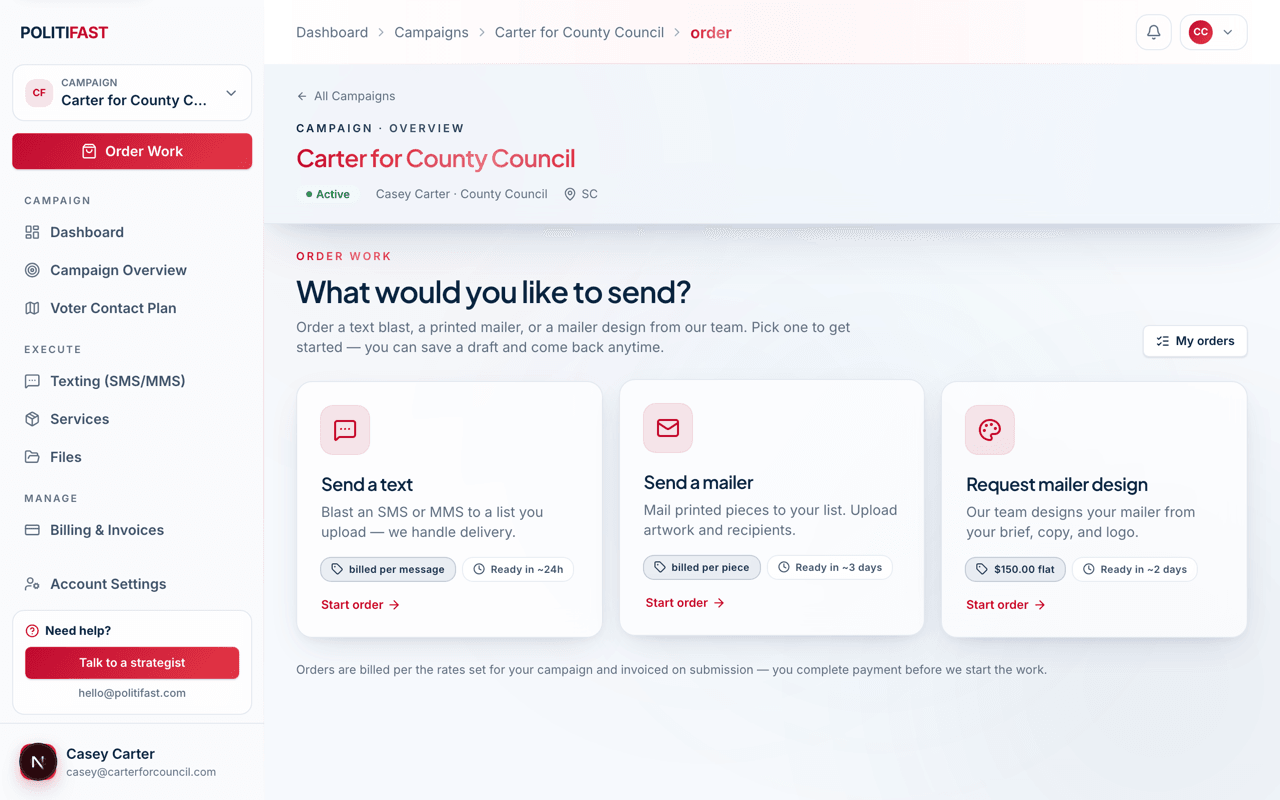
Every campaign workspace has an Order Work button — the fastest way to put our team to work. Some things you can order directly; others start as a request the team scopes and quotes.
What you can order directly
- Send a text. Blast an SMS or MMS to a list you upload — we handle delivery. Billed per message at 5¢ each.
- Send a mailer. Mail printed pieces to your list. Billed per piece, with the rate confirmed after your design is approved and before you pay.
- Request mailer design. Our team designs your mailer from your brief, copy, and logo — $150 flat, including two revision rounds, typically ready in about 48 hours.
What starts as a request instead
Website updates, consulting help, fundraising support, and ad campaigns start with a request or intake from the relevant service page — the team scopes them and quotes before anything is billed. See each service's own article for its flow.
What happens after you submit an order
- Your brief goes to the team. Submitting sends your order to PolitiFast — nothing is printed or sent yet.
- We confirm or quote. Directly-priced work moves straight ahead; per-piece and scoped work comes back with a confirmed number.
- An invoice appears in Billing. Pay it to move your order into production — work like text sends and mail drops starts only after payment clears.
- We produce and deliver. Track everything under My Orders.
Reading your order status
Orders move through a simple pipeline: draft (you're still composing) → quoted (we've confirmed the price) → awaiting payment → paid → in queue → in production → fulfilled. If an order shows a disabled state saying our team is working on it, nothing more is needed from you right now.
Try it now
A mailer design is the easiest first order — $150 flat with two revision rounds, usually ready in about 48 hours.