Submitting a Text: The Six-Step Wizard
Each step of the Submit a Text wizard, how free test texts work, what certification means, and what happens after you hit submit.
Last updated 08/05/26
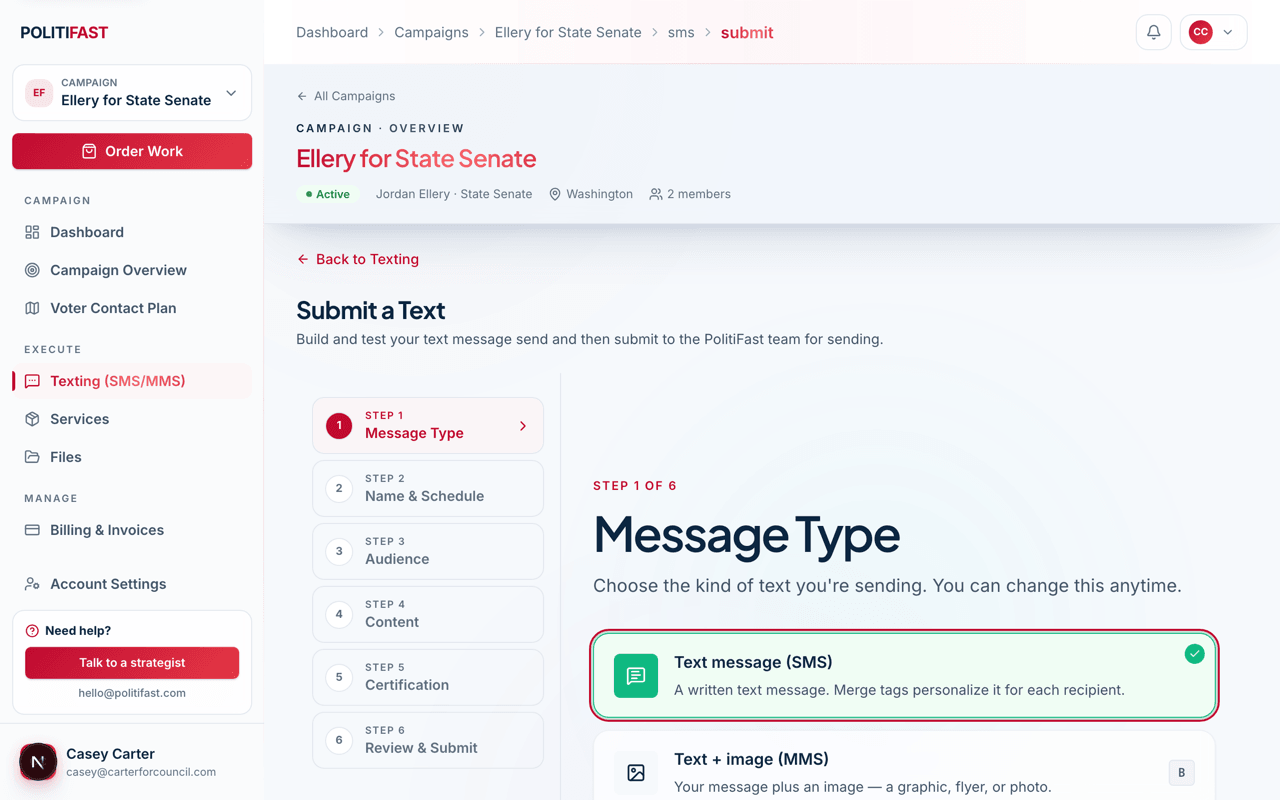
When your list is loaded and your message is written, the Submit a Text wizard walks you through six steps and hands the finished draft to our team for review. If your Sends page says to contact PolitiFast to schedule your next send, that route works too — but you can just as easily submit it yourself right here, and both paths end in the same place: team review before release.
The six steps
- Message Type — plain text (SMS), text plus an image, or text plus a video. See Sending Pictures and Video (MMS) if you're adding media.
- Name & Schedule — give the send an internal name you'll recognize later and choose when it should go out.
- Audience — pick the contact list or lists to receive it. Opted-out contacts are excluded automatically, so you never filter them by hand.
- Content — write the message or pull in a template, with merge tags for personalization. Remember to include "Reply STOP to opt out" — see Opt-Out Language: What's Automatic and What's On You.
- Certification — attest that you have permission to text these contacts.
- Review & Submit — a final summary of everything above, then submit.
Test before you submit
Every send includes free test texts to up to 2 recipients, and you can run up to 10 test sends per message. Send one to yourself and one to your campaign manager, then read it on an actual phone: check that merge tags filled correctly, the link works, and the tone reads right at phone size. Tests cost nothing and catch nearly everything.
What certification means
The certification step is your on-record attestation that you have permission to text the contacts in your audience — that they opted in or you otherwise have consent. Carriers require consent-based texting, and your certification is what stands behind every message that carries your committee's name. Take it seriously: submit lists you can vouch for.
After you submit
Your send goes to the PolitiFast team for review. We may come back with suggested edits — usually compliance or deliverability improvements — and then we release the send on the schedule you chose. You never need to do anything to fire it off; release is our job.
An invoice for the eligible recipients appears in your Billing tab. And note that quiet-hours windows can shift delivery: rules restrict texting during late-night and early-morning hours, so a send scheduled into a restricted window goes out when the window opens.
Drafts save automatically
You don't have to finish the wizard in one sitting. Your progress saves as a draft, and you can come back to any unfinished send from your Sends list and pick up where you left off. To follow a send after submission, see Tracking Your Text Sends: Statuses and Results.
First send?
Email hello@politifast.com and ask us to look over your draft before you submit — we're glad to give it a once-over.